

Action parameters
This runnable project replaces families of nearly identical commands with one typed action definition. It demonstrates select, radio, checkbox, number, and optional text controls; argv, flag, argument, and environment projections; value-dependent confirmation; option-selected commands; and static prerequisite values.
Try the TUI
From the repository root:
make build
./bin/kranz -C examples/action-parameters
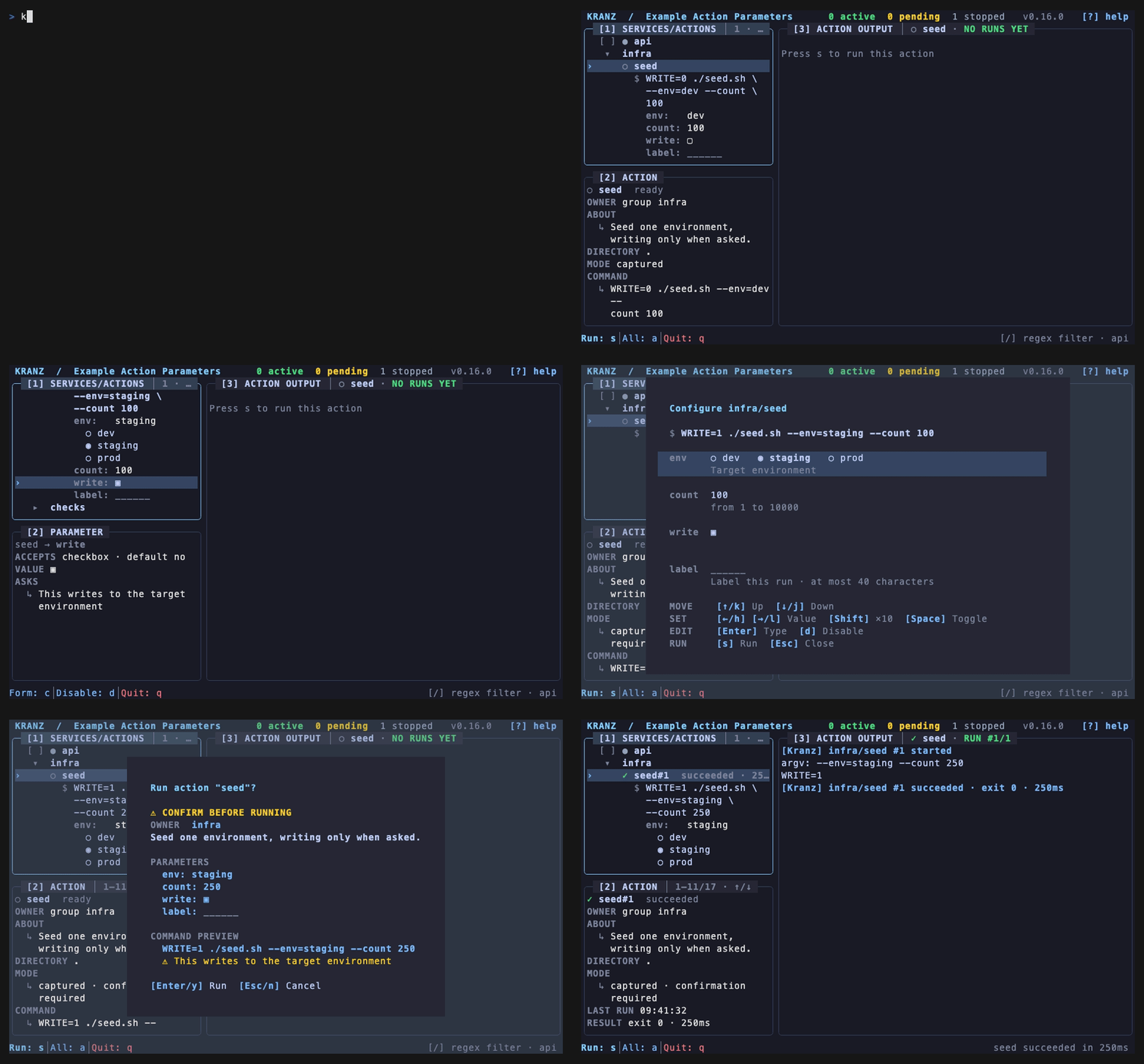
Open infra, focus seed, and press Enter. The command preview and every parameter appear below the action in declaration order. Enter opens a choice or starts editing text, Space marks a choice or toggles a checkbox, arrow keys step through compact choices and numbers, and d temporarily leaves one value out. Press c for the full parameter form or s to run the current values.
Turning on write adds a confirmation reason. The modal shows the normalized values and the exact command before the runtime reserves the execution slot.
Try the CLI
Start an empty background runtime, inspect the accepted schema, and run one invocation:
./bin/kranz -C examples/action-parameters up -d
./bin/kranz -C examples/action-parameters actions info infra/seed
./bin/kranz -C examples/action-parameters actions run infra/seed \
  --param env=staging \
  --param count=250 \
  --param label='release check'
./bin/kranz -C examples/action-parameters down
Use --no-param label to leave the optional value out explicitly. This differs from omitting a flag for a parameter that has a default: omission selects that default. Repeating a checkbox-group parameter adds values; repeating a single-value parameter is rejected.
What to inspect
kranz.yamlcontains the controls, projections, option commands, and prerequisite.seed.shprints its argv and projected environment so the execution is observable.kranz actions info infra/seed --output jsonincludes the parameter metadata and JSON Schema used by CLI and MCP clients.kranz runs infra/seedandkranz actions run ... --output jsonretain the normalized parameter values and display-only command preview.
All names and values in this example are synthetic. It opens no network ports and writes no data outside its own process output.