

Core concepts
Kranz becomes much easier to configure once seven ideas are separate.
Runtime
A runtime is one active Kranz session for one project. It owns that project's supervisor, service state, logs, and numbered run history. The TUI, CLI, and MCP are clients of the same runtime; connecting another client does not start a second copy of the services.
These names describe different levels:
| Term | Meaning | Example |
|---|---|---|
| Project | The configuration and its display name | project: Shop |
| Runtime | One active session of that project | shop-dev in kranz ps |
| Service | One long-running or detached component inside the runtime | api |
| Run | One numbered execution of a service or action | api#4 |
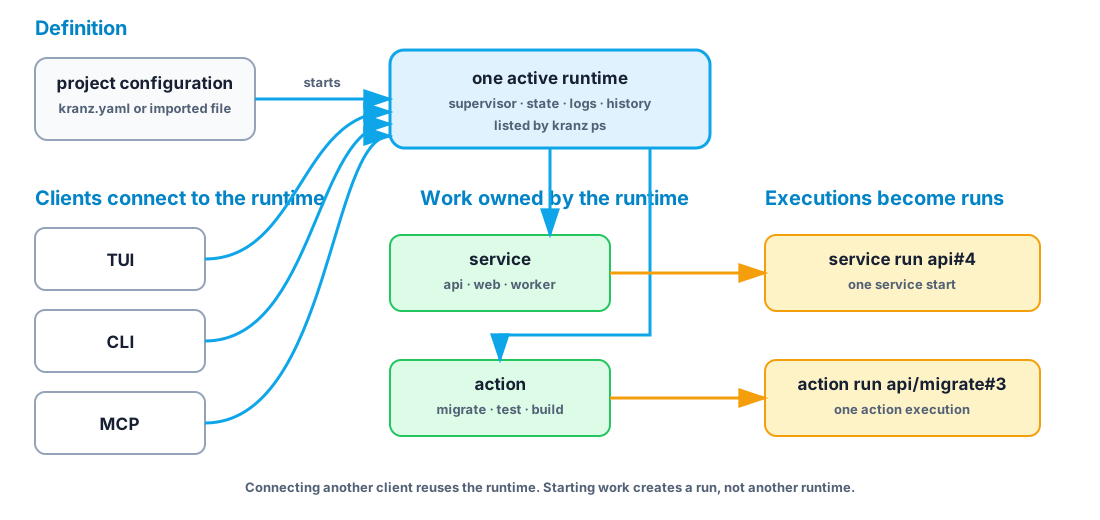
Running bare kranz ensures an independent runtime exists and opens its TUI. The quit confirmation can either stop that runtime or detach the TUI and leave everything running. kranz up -d starts without opening a long-lived client; kranz attach opens another TUI client, and kranz down ends the runtime. Use kranz ps when you are unsure which runtimes already exist.
Service
A service is something with a lifecycle: start it, observe it, and eventually stop it. APIs, web dev servers, workers, and local databases are services.
services:
  api:
    command: npm run dev
For a normal service, Kranz owns the process group, captures its output, and knows it stopped when the process exits.
Dependency
A dependency answers two questions:
- What must start first?
- What evidence means it is ready for the dependent?
services:
  web:
    command: npm run dev
    depends_on: [api]
    dependency_conditions:
      api:
        condition: process_healthy
Starting web also starts api. web waits until the API readiness check passes. Stopping api first stops web, because dependents are stopped in reverse order.
Health check
A running process is not necessarily a usable service. Readiness answers “may dependents start?” Liveness answers “is this running service still healthy?”
healthcheck:
  readiness:
    type: http
    url: http://127.0.0.1:3000/ready
    interval: 2s
Health does not start or stop anything by itself. It supplies evidence to the UI and dependency graph.
Action
An action is a command that should finish. Lint, test, build, migrate, seed, and docker compose ps -a are actions—not services.
services:
  api:
    command: npm run dev
    actions:
      lint:
        command: npm run lint
      migrate:
        command: npm run migrate
        confirm: true
Actions have their own output, exit status, timeout, and optional confirmation. They do not pretend to be continuously running.
Run and log history
A run is one execution of a service or action. Starting api creates a service run such as api#4; invoking its migration creates a separate action run such as api/migrate#3. Numbers increase independently for each target and are never reused during the runtime session.
The run summary answers what happened: who started it, why, how long it ran, and how it ended. The retained log events answer what it printed, with each line attributed to stdout, stderr, or Kranz itself. Summary and output have separate bounded retention, so an old summary may remain after some or all of its output has expired; Kranz reports that state explicitly as complete, partial, or unavailable.
See Logs, runs, and ports for the visual model, CLI queries, and TUI navigation.
Detached service
Sometimes the start command exits while the thing it started remains alive:
docker compose up -d
ssh host 'start-remote-stack'
There is no child PID for Kranz to supervise. A detached lifecycle provides the missing operations explicitly:
supervision: detached
stop_on_exit: false
lifecycle:
  start:
    command: docker compose up -d
  stop:
    command: docker compose down
  status:
    type: command
    command: ./is-stack-running.sh
    running_exit_codes: [0]
    stopped_exit_codes: [3]
Here status means “does the external resource exist and run?” It is not a readiness check. With stop_on_exit: false, the resource survives Kranz; the status probe reconnects it as Running in the next session.
How the pieces fit

Next: learn the configuration format or choose a runnable example.