

Coding agents and your live runtimes
Kranz MCP lets a coding agent join the local runtimes already open in your TUI. The agent sees the same services, actions, readiness, ports, action-run numbers, and bounded logs. It does not start a second development stack.
One registration covers every project. kranz mcp takes no project argument, creates nothing when a client connects, and picks the runtime per call — so "read the logs of the service I am looking at" works in the project you are in, and in the one next door.
Here a runtime is one active Kranz session for a project, not another server installed by the agent. If the distinction between project, runtime, service, and run is new, read the short Core concepts table first.
TUI, CLI, and MCP are three views of the same application API:

The TUI is the interactive operator view, the CLI is the terminal and scripting view, and MCP is the coding-agent view. None of them shells out to another.
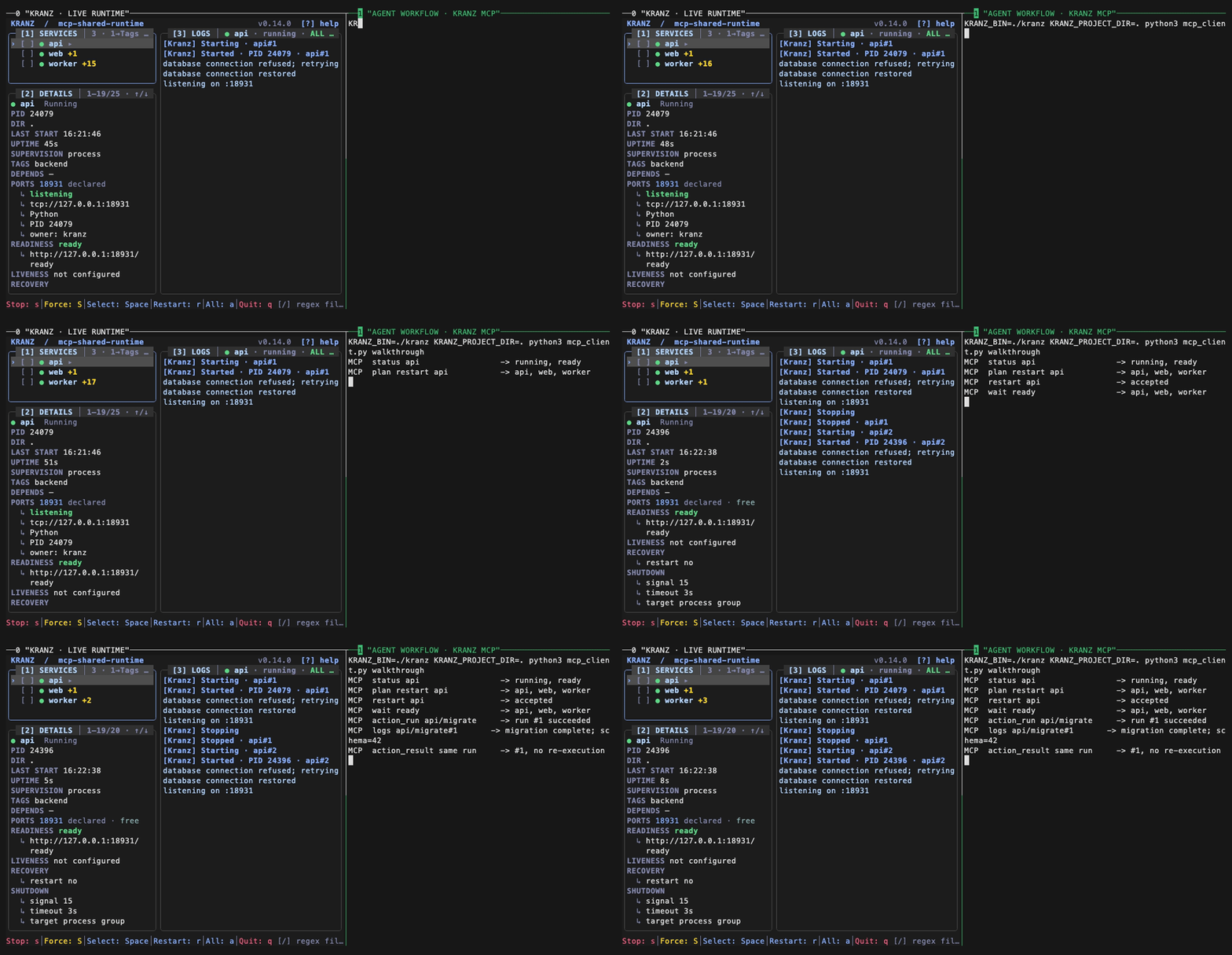
The recording is a real Codex session, not a scripted imitation. The Kranz TUI on the left and the coding agent on the right are attached to one runtime. Codex asks Kranz to resolve the restart, confirms the exact affected set, performs the operation, and waits for readiness through MCP. The recording runs from an isolated temporary project; setup and cleanup are hidden, and no account, credential, home-directory path, real project, or terminal history is shown. Its recording driver accepts only the plan, restart, and wait prompts for that temporary Codex session and does not persist approval rules.
Install and verify Kranz
The MCP bridge is part of the ordinary kranz binary; there is no separate server package to install. Follow the installation guide, then verify that your build includes the command:
kranz version
kranz mcp --help
The bridge uses foreground stdio. Register it once, with no arguments, and let the client start and supervise the command. It starts even in a directory with no Kranz configuration, and it never creates a runtime just because a client connected.
Register the server
Codex
codex mcp add kranz -- kranz mcp
codex mcp list
Codex also supports a project-scoped .codex/config.toml:
[mcp_servers.kranz]
command = "kranz"
args = ["mcp"]
The Codex CLI, IDE extension, and ChatGPT desktop app on the same host share this configuration. In an interactive Codex session, use /mcp to inspect the connected server. See the official Codex MCP setup for client-side configuration and approval options.
Claude Code
One user-scoped registration covers every project:
claude mcp add --scope user kranz -- kranz mcp
claude mcp get kranz
OpenCode
{
  "$schema": "https://opencode.ai/config.json",
  "mcp": {
    "kranz": {
      "type": "local",
      "command": ["kranz", "mcp"],
      "enabled": true
    }
  }
}
Check it with opencode mcp list. Use absolute paths when the client does not inherit the same PATH as your shell.
Install the companion agent skill
The MCP connection exposes Kranz operations, but a connection alone does not teach an agent when to reuse a developer's runtime, how to match a nested working directory, or which mutations require an explicit request. Kranz ships that operational policy as an English, vendor-neutral agent skill in skills/kranz-services.
In Codex, ask the built-in installer:
$skill-installer install kranz-services from https://github.com/kranz-org/kranz/tree/main/skills/kranz-servicesFrom an existing clone, a manual user-level installation is also just a copy:
mkdir -p ~/.agents/skills
cp -R skills/kranz-services ~/.agents/skills/
Codex discovers the skill automatically; restart it if the new skill does not appear. Other clients that implement the open Agent Skills format can install the same directory in their supported skill location.
Check the first connection
Open the configured client in that project and ask:
Which Kranz services are running, and which are not ready?
The client should discover Kranz resources and tools without you naming protocol calls. The MCP process itself never appears in kranz ps — it supervises nothing — but kranz clients shows it attached to whichever runtime it just answered from. Closing the client leaves the TUI and services running.
How a call finds its runtime
Every tool except runtimes, up, and down takes an optional runtime argument. The address is resolved in this order, first match wins:
- the
runtimeargument, naming a project by name or id; - the
-C/-ppin, if the server was registered with one; - the directory the client started the server in, looked up in the registry the same way
kranz logslooks it up without-p; - otherwise
runtime_required, listing every running runtime as a candidate.
Nothing in that chain creates a runtime. Step 3 is a lookup, which is why the directory is safe to use here: an agent registered in one project reaches that project by default, and reaches any other by naming it.
The working directory is fixed when the client spawns the server, so it does not follow you as the conversation moves to another project. That lands on runtime_required, and its candidates can be passed straight back:
{
  "code": "runtime_required",
  "message": "no runtime was addressed and this MCP server has no project of its own",
  "details": {
    "candidates": [
      {
        "runtime": "shop-dev",
        "id": "7fa21c8d",
        "directory": "/workspace/shop"
      },
      {
        "runtime": "billing",
        "id": "91bc430a",
        "directory": "/workspace/billing"
      }
    ]
  }
}
The same holds one level down: if reports is missing here but exists in billing, selector_not_found carries available_in, and repeating the call with that runtime succeeds.
Server, project, and runtime names
The same setup exposes three related names, each with a different job:
kranzinmcp_servers.kranz,mcp add kranz, or the OpenCode key is the MCP client's local alias for this connection;project: "Shop"is the display title fromkranz.yaml;shop-devinkranz psis the runtime name. It comes fromruntime.namewhen that field is set, otherwise from a stable lower-case slug ofproject.
Runtimes and the clients attached to them are listed separately: kranz ps answers "what is running", kranz clients answers "who is working in it". An MCP server is a client, never a row in ps.
By default that client identifies itself as Kranz MCP. A launcher may set KRANZ_MCP_CLIENT=codex in the MCP server environment to display MCP: codex instead, which is useful when several agent clients share a runtime. This is a display label only; runtime addressing still follows the rules above.
Pinning a connection to one project
-C DIR, -f FILE, and -p NAME|ID pin the server to one project. A pinned connection resolves everything to that runtime and refuses any other address with runtime_pinned — useful when a client should be unable to reach beyond one checkout.
Starting a project the agent was asked to start
An agent can bring up a project that is not running, and only when asked:
upstarts the runtime and no services. It requiresconfirm: true, because the runtime it creates is a background process that outlives the session and stays inkranz psuntil someone stops it.- Every other tool answers
runtime_not_foundfor a project that is not running, and namesupin the hint. Asking for logs never starts anything. downreaches only a runtime this MCP session started withup. A project you are working in answersnot_owned.
Starting services stays a separate, deliberate start call against a resolved plan.
Try prompts that describe an outcome rather than protocol calls:
- Which services are not ready, and why?
- Show the latest failed
api/migraterun. - Restart
apiand wait until it is ready; do not stop the rest of the stack. - What changed in the environment since I edited the handler?
- I added a service to kranz.yaml — reload and start it.
Several agents, several runtimes
One MCP process serves any number of runtimes at once, and any number of agents can attach to one runtime — that is what kranz attach has always allowed. Each answer names the runtime that produced it in session, so a result can never be misread as coming from the project you happened to be thinking about.
Closing an MCP client closes its connections and nothing else. The runtimes it was talking to keep running, including one it started itself with up: that runtime is owned by its own background process, exactly like kranz up -d.
The path is the same as the CLI:

Actions and exact runs
Actions keep monotonic run numbers. action_result accepts an absolute run or a negative offset such as -1; logs uses the same identity. Interactive actions return interactive_action and must be run in the TUI or terminal CLI.
Services are numbered the same way: every start opens a run, so logs with run: -1 on a service reads the newest start on its own, without the agent reconstructing a time range around a restart.
What changed since I last looked
The question a coding agent asks after editing code is not "what is the state" but "what did my change do to the environment". status cannot answer it: a service that crashed and was restarted looks exactly like one that never moved. changes answers it directly.

Anything that carries a cursor hands one back, so the loop closes: wait returns the cursor it finished at, and passing the cursor you held before the wait to changes replays what happened during it. When the bounded journal has already dropped part of the answer, the result says truncated: true rather than quietly returning a shorter story.
Why a service is not running
A stopped service is not a reason. status carries a structured cause when the reason is not the state itself:
{ "name": "api", "state": {"status": "stopped", "cause": {
    "type": "prerequisite_failed", "action": "api/migrate", "action_run": 3 }}}
dependency_failed names the dependency and its exit code, port_conflict names the port and the process holding it, and exited carries the exit code. For probes, health reports the target that was contacted and the error it returned, so a readiness failure reads as connection_refused at a named URL rather than as a boolean. port_inspect answers "who took my port" for any port, including processes Kranz does not manage.
Reproduce the shared-runtime proof
The MCP shared-runtime example performs live stdio calls and includes the exact commands behind the recording. It does not print fixture results. The CLI and MCP client report one session identity, and reading an action result twice does not execute it again.
For protocol schemas, resources, tools, cursors, confirmation, and error codes, see the MCP reference.